
A Melbet download in Bangladesh comes in two forms — the Melbet APK for Android and the official Melbet app for iOS. Both builds open the same sports betting, cricket, Aviator and casino sections from your phone, and both use the same account and cashier.
Every Android figure on this page comes from the file and the phone, not from a marketing sheet. We installed the app on Android and screenshotted each step — the install prompt, the version screen, the storage the app actually takes, the bet slip in BDT and the cashier — and on 12 October 2026 we took the current build 258.0.5 from Melbet’s official Bangladesh site and read its version, package, signing certificate and permission list straight from the file. Below you will find that process, how to check the file you downloaded is genuine, fixes for the install errors BD players hit, and the extra step iPhone users have to take before the app even appears in the App Store.
Melbet App and APK — Specifications for Bangladesh
The Melbet app Bangladesh players install comes in two builds: the Melbet APK for Android and the iOS version from the Apple App Store. Both share the same backend, account and cashier, so your login works across devices and balance, bets and bonuses sync instantly.
The Android figures below were read from the 258.0.5 file downloaded from Melbet’s official Bangladesh site on 12 October 2026. You can confirm every one of them yourself — see how to check your APK is genuine.
| Specification | Android APK | iOS |
|---|---|---|
| App name | MelBet | Melbet: Live Sports Betting |
| Package name | org.melbet.vac | — |
| Current version | 258.0.5 | 258.0 (October 2026) |
| Download size | 42.9 MB | 295.5 MB |
| Size after install | About 135 MB (measured on 256.0.26) | — |
| Processor support | arm64, armeabi-v7a, x86, x86_64 | — |
| Minimum OS | Android 7.0 or later | iOS 15.0 or later |
| Developer | Pelican Entertainment B.V. | Pelican Entertainment B.V. |
| Licence | Curaçao OGL/2024/561/0554 | Curaçao OGL/2024/561/0554 |
| Interface languages | English, Bengali and 40+ more | English + 52 more |
| Age rating | 18+ | 18+ |
| Price | Free | Free |
Key facts about the Melbet app:
- Free Melbet APK download — no subscription and no in-app purchases
- Live cricket streams play inside the app, next to the odds
- Stakes run from 15 BDT to 156,000 BDT on a single bet
- Deposit via bKash, Nagad, Rocket, CellFin, uPay and more, straight from the cashier
- Android 7.0 is a hard floor — the package will not install on Android 6 or older
Melbet APK Download for Android — Free Download and Install
Google Play does not list real-money betting apps in Bangladesh, so the Melbet APK is installed manually. The download button on this page opens the official file straight from Melbet’s own server — the file is named melbet.apk and the current build, 258.0.5, weighs 42.9 MB. On a normal mobile connection it takes under a minute.
- Tap the download button on this page. The file starts downloading immediately — there is no registration step before it.
- If your browser warns that files of this type can harm your device, confirm the download. Chrome shows this for every sideloaded APK; it is not specific to Melbet.
- Open the downloaded file from your notification shade or the Downloads folder.
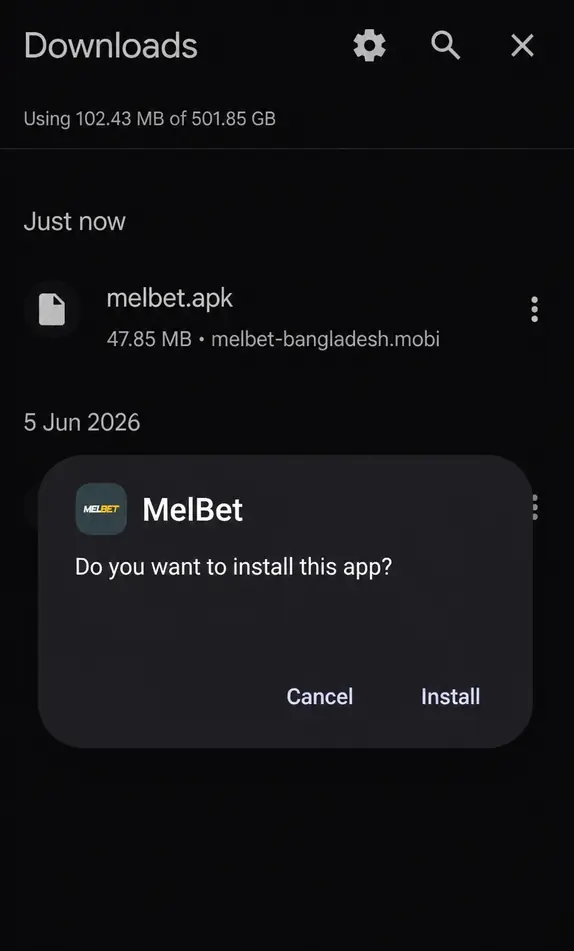
- If Android asks for permission to install from this source, allow it: Settings → Apps → Special app access → Install unknown apps → your browser → Allow from this source. On many phones this prompt does not appear at all and the install goes straight through.
- Tap Install on the confirmation dialog and wait a few seconds.
- Open the app and sign in — the Melbet login guide covers the process if you get stuck.
Melbet APK — Supported Android Devices
The Melbet APK installs on Android 7.0 and later — Samsung, Xiaomi, Realme, OPPO, Vivo, OnePlus, Google Pixel and others. Devices running Android 6 or earlier cannot run this build; the installer rejects the package before it starts. For live streaming, a stable connection matters more than the phone.
How to Update the Melbet APK to the Latest Version
Android does not update sideloaded apps automatically. To move to a newer build, download the current Melbet APK again and install it over the existing app. Do not uninstall first — installing over the top keeps your saved login. If you do uninstall, your account, balance and bet history are stored server-side and are not affected.
Why the Installed Melbet App Is Bigger Than the APK
This catches people out, so it is worth stating plainly: the download and the installed app are not the same number. The APK is a compressed archive. When Android installs it, the contents are unpacked and the app’s code is compiled for your specific processor, which takes considerably more space than the packed file.
On our test device, build 256.0.26 reported the following under Settings → Apps → MelBet → Storage. The current 258.0.5 file is about 5 MB smaller to download, so expect a similar footprint:
| Item | Size |
|---|---|
| Downloaded APK file (256.0.26) | 47.85 MB |
| App size after install | 135 MB |
| User data | 12.74 MB |
| Cache | 11.04 MB |
| Total occupied | 159 MB |
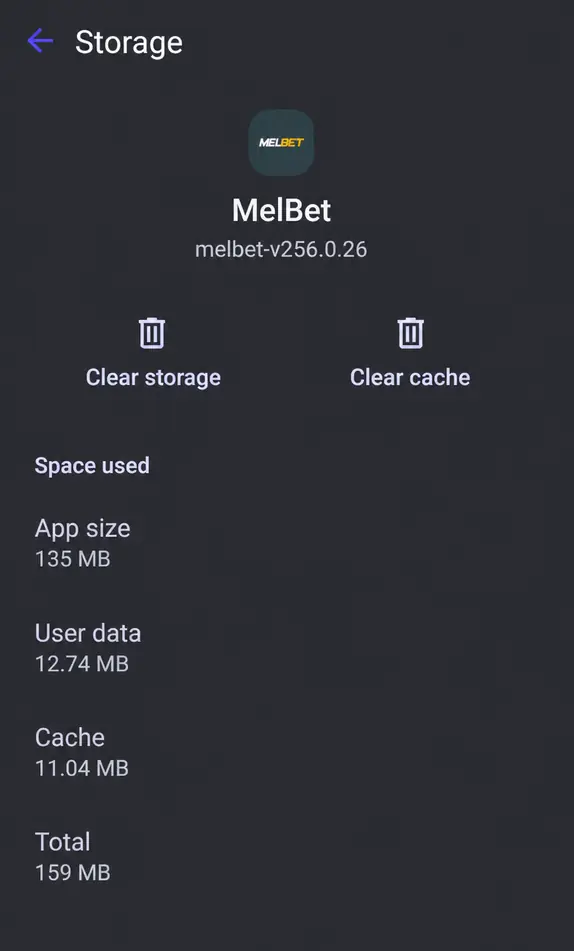
Plan for roughly 160 MB of free space, not 48 MB. Cache grows as you use live streams and can be cleared at any time without touching your login — see the fixes section.
How to Check Your Melbet APK Is Genuine
Repackaged betting APKs circulate on file-sharing sites and Telegram channels. A modified build can look identical and still forward your login details. Three checks take about a minute and all of them run on your own phone.
Check the signing certificate — the only reliable test. Every APK is signed, and a repackaged file cannot carry the original signature. The 258.0.5 file from Melbet’s official Bangladesh site is signed with a certificate whose SHA-256 fingerprint is:
B4:88:22:0C:35:BD:C8:E8:87:25:71:C6:82:BE:72:E0:13:87:72:F0:8F:C4:0F:09:8E:ED:05:1D:16:B5:87:12
Any APK inspector from the Play Store will show the signature fingerprint of an installed app. If yours does not match, the file was re-signed by someone else — uninstall it and change your Melbet password.
Check the build number. Settings → Apps → MelBet shows the version under the app name, and the same number appears on the splash screen. The current file reads melbet-v258.0.5. A version quoted on a download page proves nothing; the number on the installed app does.
Do not rely on the package name. It is not a stable marker: the current official build is org.melbet.vac, while earlier builds we checked used org.melbet.client. Guides that tell you one exact package name proves a file is genuine are out of date the moment the operator changes it.
Melbet APK Permissions Explained
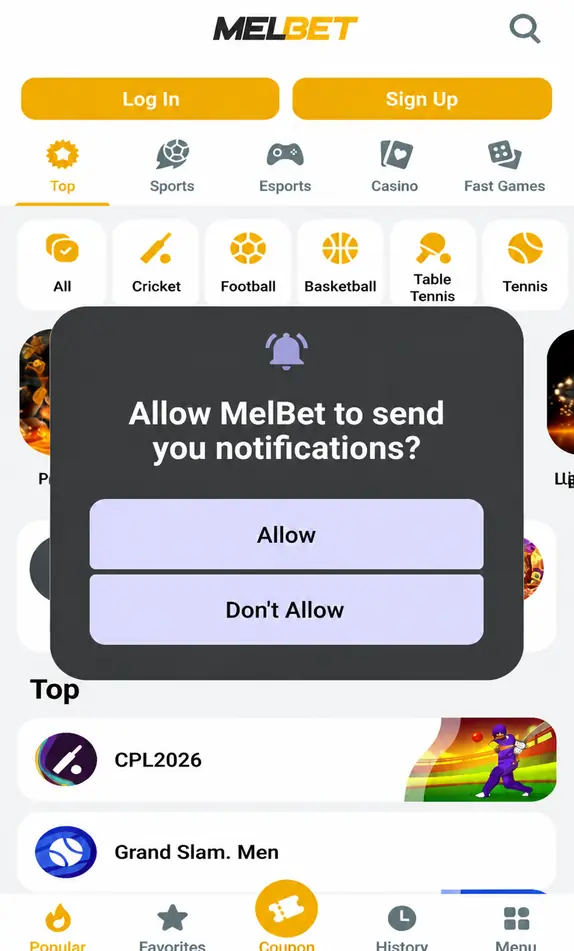
We read the full permission list from the 258.0.5 file. Most entries are granted silently at install; the sensitive ones — location, camera, microphone, phone state, notifications — Android asks you about before the app can use them. On our test install, first launch asked for notifications only, and declining it disables push alerts and nothing else.
| Permission declared | Typically used for | How it is granted |
|---|---|---|
| Internet, network and Wi-Fi state | Loading odds, scores, streams and the cashier | Granted at install |
| Notifications | Odds changes, settled bets, promotions | Asked on first launch |
| Camera | Uploading KYC documents during verification | Asked on use |
| Location (approximate and precise) | Region checks tied to your account | Asked on use |
| Microphone and audio settings | Voice features such as calls to support | Asked on use |
| Phone state | Device identification for account security | Asked on use |
| Fingerprint / biometrics | Unlocking the app instead of a password | When you enable it |
| Storage | Saving files such as bet slip screenshots | Asked on use |
| Display over other apps | Floating windows such as in-play overlays | Off until you turn it on |
| Install packages | Installing app updates from inside the app | Off until you turn it on |
| Run at startup, keep awake, exact alarms | Delivering notifications on time | Granted at install |
The official file does not declare access to contacts, SMS or your call log. If an installer asks for any of those, you are holding a repackaged file — stop the install and delete it. Anything you are unsure about can be switched off later under Settings → Apps → MelBet → Permissions.
Melbet APK Installation Problems and How to Fix Them
There Was a Problem Parsing the Package
The download did not finish, or the file is corrupted. Delete the APK from your Downloads folder and download it again — do not resume a partial file. If it repeats on mobile data, switch to Wi-Fi; some carrier proxies truncate large downloads.
The same error appears when the device is below Android 7.0. Check Settings → About phone → Android version before retrying.
App Not Installed
Usually a conflict with another Melbet build already on the device that was signed with a different certificate — check it against the fingerprint above. Uninstall it completely, then install the official APK. No account data is stored on the device, so nothing is lost.
The same message appears when internal storage is full. The installed app needs around 135 MB, so free at least 200 MB before retrying.
Play Protect Blocks the Install
Play Protect flags sideloaded gambling apps by default, regardless of the file. It did not appear on our test device, but if it does on yours, tap More details → Install anyway. If that option is missing, open the Play Store → profile icon → Play Protect → Settings, turn scanning off temporarily, install, then turn it back on.
The App Installs but Will Not Open
Clear the cache: Settings → Apps → MelBet → Storage → Clear Cache. This removed 11 MB on our device and does not touch your login. Do not tap Clear Storage — that wipes saved credentials and forces full re-authentication.
The Download Stops Midway
Switch from mobile data to Wi-Fi, or the other way round, and disable any VPN while downloading. Routing a 48 MB file through a free VPN is the most common cause of truncated APK files.
Melbet App Download for iOS in Bangladesh — Step by Step
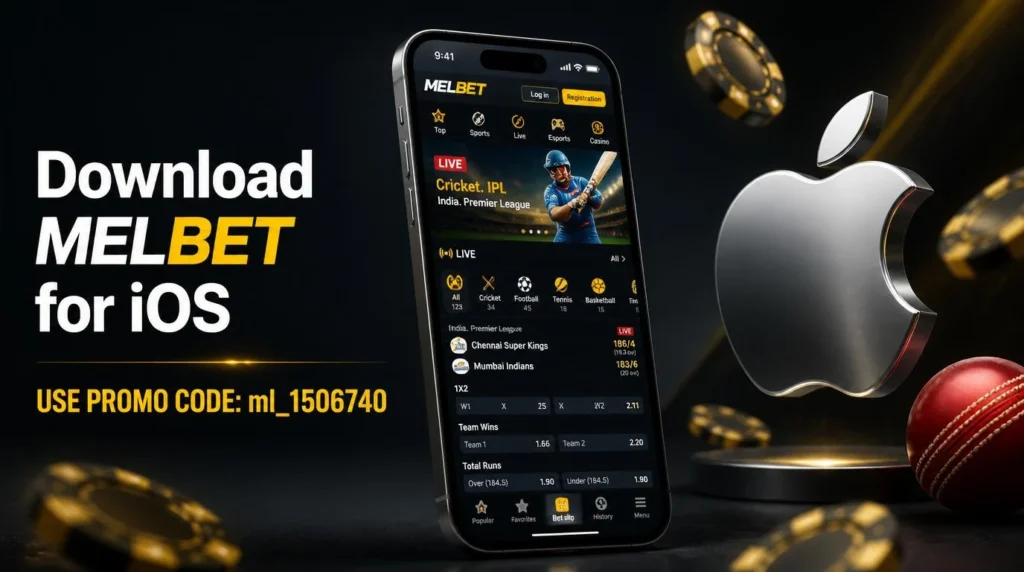
iOS users do not need the APK process, but there is one thing to know first: the Melbet app does not appear in the Bangladeshi App Store. Searching for it on an Apple ID registered to Bangladesh returns nothing. This is a regional listing restriction, not a fault on your device, and it is why so many BD players assume there is no iOS app at all.
The app exists as Melbet: Live Sports Betting (developer Pelican Entertainment B.V.), and in the Vietnam App Store — one of the regions it is listed in — it holds a 3.5★ rating from 468 ratings and sits at No. 3 in the free Sports chart (checked 12 October 2026). To reach it you change the region on your Apple ID. Melbet publishes this instruction on its own site and lists the regions where the app is available — Vietnam and Mongolia are among them.
How to Change Your Apple ID Region
- Spend or transfer out any remaining App Store balance — the change is blocked while a balance exists.
- Cancel active subscriptions and wait for the current period to end.
- Open Settings → your name → Media & Purchases → View Account → Country/Region → Change Country or Region.
- Select Vietnam or Mongolia.
- Agree to the terms and choose None as the payment method. A local address is required — any valid-format address for that country is accepted at this step.
- Return to the App Store, search Melbet, and tap Get. Confirm with Face ID, Touch ID or your Apple ID password.
- Wait for the download to finish — the build is 295.5 MB, so use Wi-Fi.
What Changes and What Does Not
Your Melbet account, balance, bonuses and BDT currency are unaffected — they live on Melbet’s servers, not on your Apple ID. What changes is the App Store you browse: apps bought in the Bangladeshi store stay installed but may not update until you switch back. You can switch the region back at any time and the Melbet app stays installed.
Supported iOS Devices and Updates
The app runs on any iPhone or iPad updated to iOS 15.0 or later. On an older build, update via Settings → General → Software Update before installing. Unlike the Android APK, iOS updates arrive automatically through the App Store — as long as your Apple ID stays on a region where the app is listed.
Melbet APK Latest Version, Old Versions and Update History
The latest Melbet APK version for Android is 258.0.5, and the iOS build is 258.0 (App Store update in early October 2026). We keep a copy of each Android build we download and compare it against the previous one. This table is refreshed in the first week of every month.
| Version | Download size | Installed size | Minimum Android | Notes |
|---|---|---|---|---|
| 258.0.5 | 42.9 MB | Not yet recorded | 7.0 | Current build, taken from Melbet’s official Bangladesh site on 12 October 2026. Package org.melbet.vac. |
| 256.0.26 | 47.85 MB | 135 MB | 7.0 | Installed and screenshotted for this guide in August 2026. |
| 255.0.6 | 53.83 MB | Not recorded | 7.0 | Package org.melbet.client. |
The download has shrunk three releases in a row — 53.83, then 47.85, then 42.9 MB — without features disappearing. It is not a cut-down build for one type of phone: 258.0.5 still carries native code for all four processor families (arm64, armeabi-v7a, x86, x86_64). Melbet publishes no changelog, so the exact reason is not public; a smaller file on its own is not a sign of a fake.
Our archive of Melbet APK builds starts in June 2026, when we began keeping copies of each release. We do not recommend installing an old version of the Melbet app from a mirror site — outdated builds can fail to load live odds or the cashier, and mirror copies are the ones most often repackaged.
Melbet App Features After Download
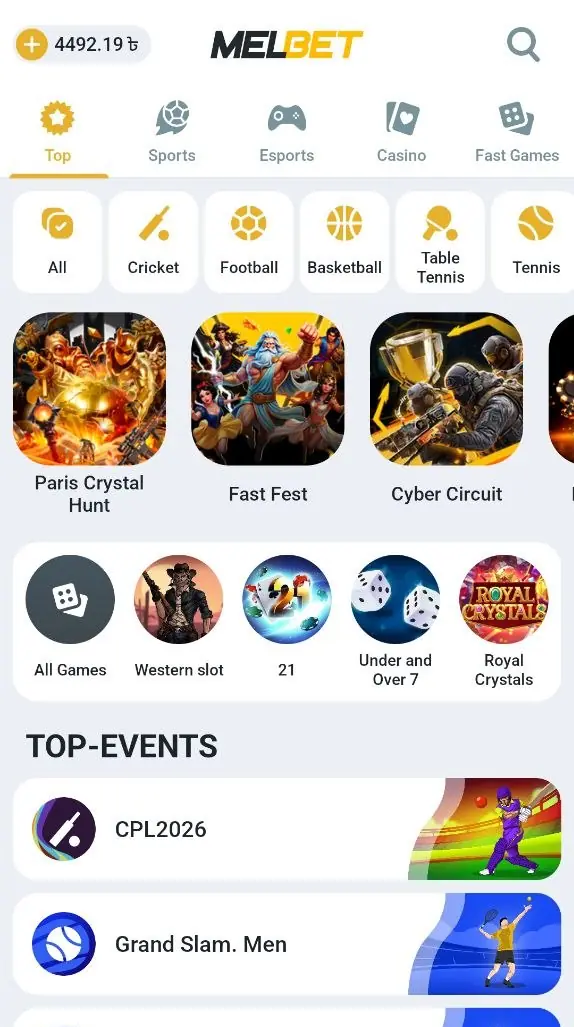
The first screen after install is the Top tab, with sports filters across the top and the current headline events underneath. Cricket sits first in the filter row, ahead of football — which tells you who the BD build is aimed at.
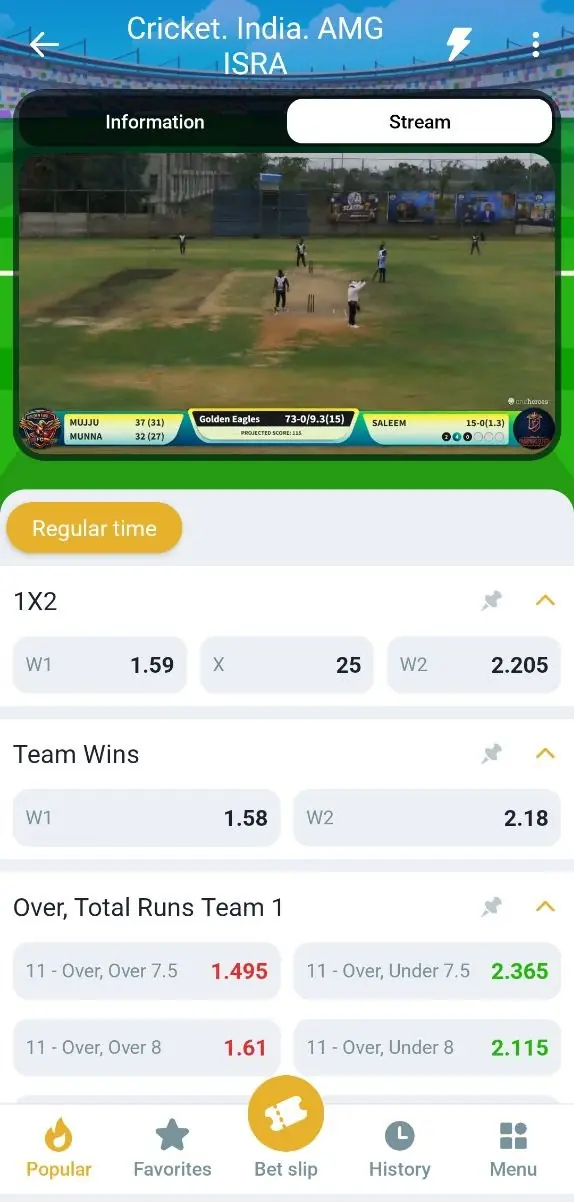
Live Cricket Streaming Inside the App
Matches with a stream show an Information / Stream toggle above the markets. The video plays in the same screen as the odds, so you are not switching between apps to follow a match you have money on. Coverage in our session included Indian and Sri Lankan domestic T20 tournaments alongside the international fixtures.
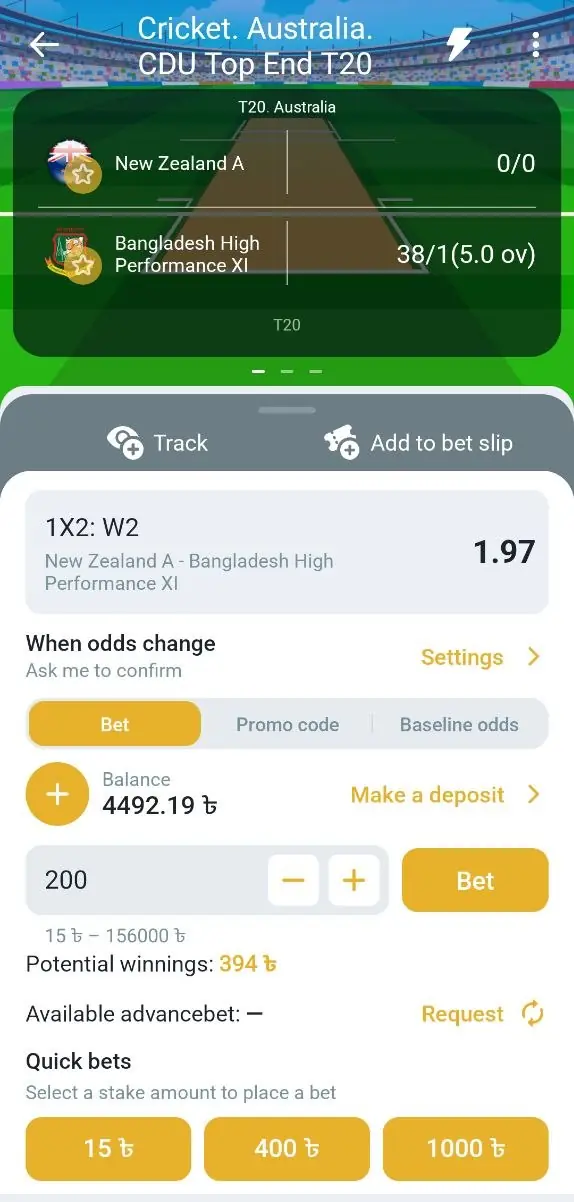
The Bet Slip and Stake Limits
Stakes are entered in BDT with quick-stake buttons underneath. On the market we tested, the accepted range ran from 15 BDT to 156,000 BDT on a single bet, with quick stakes of 15, 400 and 1,000 BDT. Potential returns update as you type, and the slip warns you before accepting a changed price if you have set it to ask.
Changing the App Language to English or Bengali
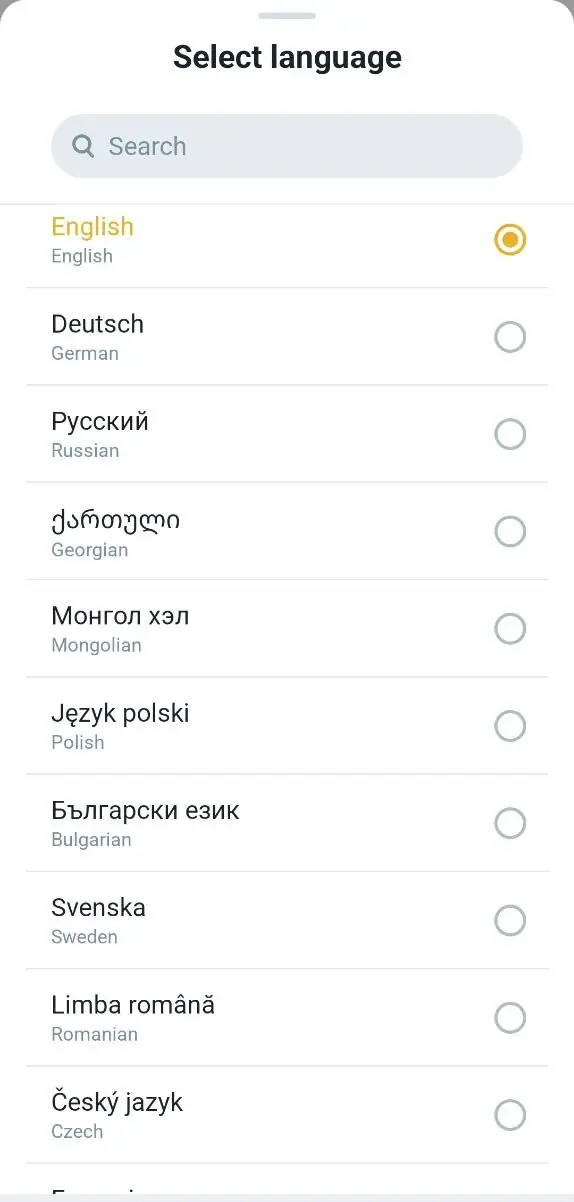
The app picks its language from your phone, which is why some BD users open it and find an interface they did not expect. Change it under Menu → Settings → Language. English sits at the top of the list and বাংলা is available further down, alongside more than forty other options.
Beyond that, the app carries 40+ sports including cricket, football, kabaddi, basketball and esports, live betting with in-play statistics, express and system bets from one slip, push notifications, and fingerprint or Face login. For the full breakdown of markets and bet types, see the Melbet sports betting guide.
Bonuses in the Melbet App
Right after installing, opt in during registration and choose one welcome offer: the sports bonus (100% up to 12,000 BDT, from a 100 BDT deposit) or the casino package (up to 315,000 BDT + 250 free spins across the first three deposits). Bonuses are credited automatically once your profile is complete and your phone number is activated.
Full wagering terms, the deposit series and how to apply promo code ml_1506740 are covered on the Melbet promo code page.
Casino & Games in the Melbet App
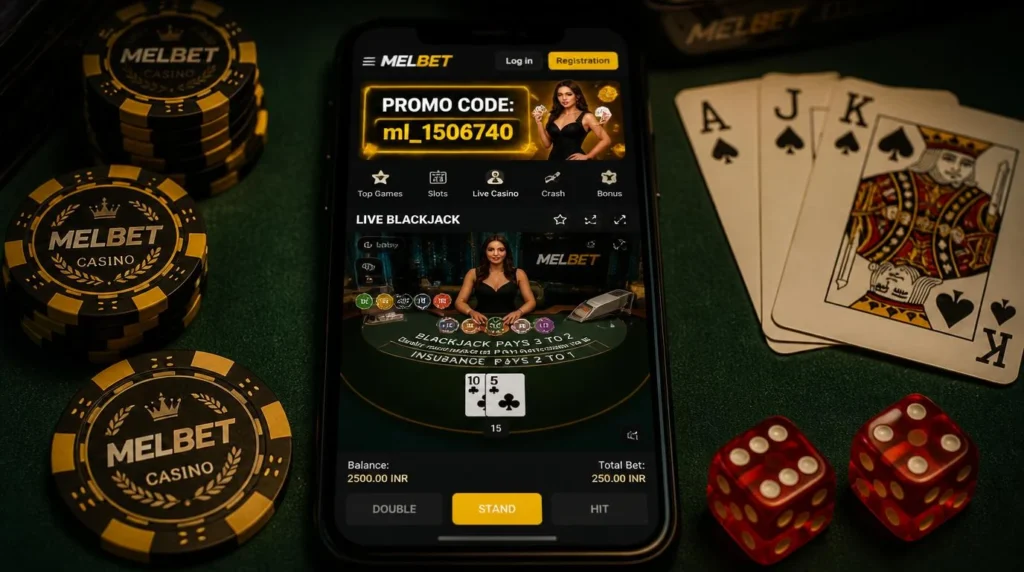
The app gives full access to Melbet’s casino — slots, live dealers from Evolution and Winfinity, Aviator, table games and demo play — with the same performance as the desktop site. For the complete game library, providers and bonuses, see the Melbet casino review.
Deposits and Withdrawals in the Melbet App
The cashier opens inside the app and handles everything in BDT. Deposits start from 100 BDT and you can register, verify and withdraw without leaving the app. The methods listed for a Bangladeshi account during our session:
| Group | Methods available |
|---|---|
| Recommended | Nagad, Nagad Free (0% commission), bKash, Rocket Free, Neteller |
| E-wallets | CellFin, uPay, Nagad by Paykassma, bKash, Skrill, MoneyGo |
| Crypto | BinancePay, BybitPay, KuCoin, Bitget |
| Internet banking | Nexus Pay |
| Cards | Visa, MasterCard — work for both deposits and withdrawals |
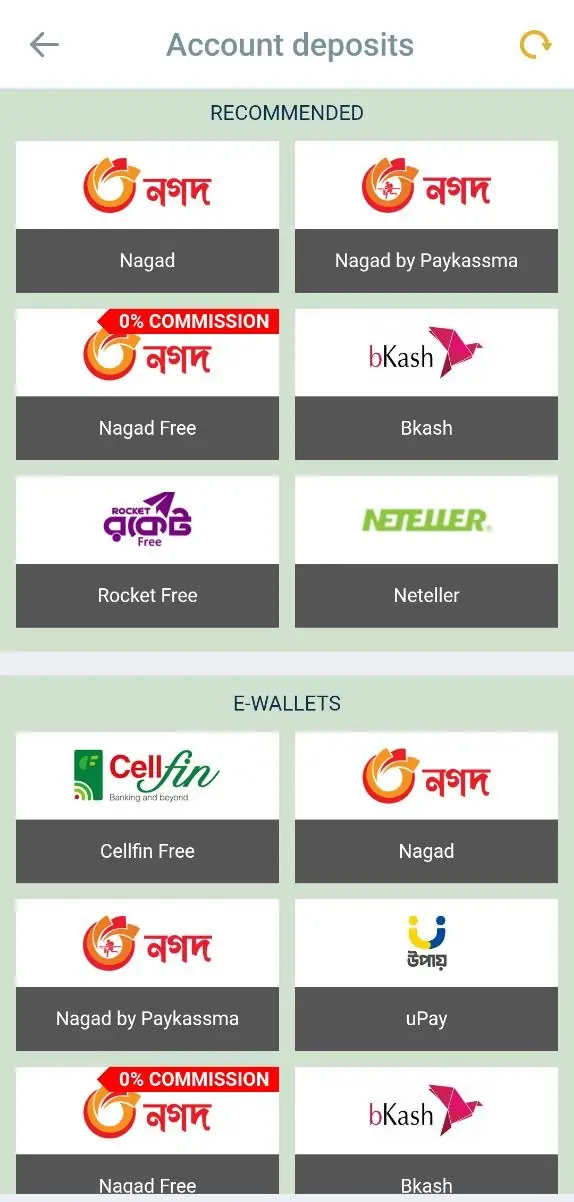
Bank cards work in both directions — worth stating, because several guides list them as withdrawal-only. Full limits and step-by-step instructions are in the Melbet payment methods guide. Complete KYC before your first withdrawal request; verification is the most common reason a payout looks stuck.
Melbet Mobile App vs Mobile Website
The Melbet mobile app and the mobile website open the same account, the same markets and the same cashier. The app is faster, uses less data, supports push notifications and biometric login. If your device is below Android 7.0, or you would rather not install an APK file at all, the mobile site is the working alternative — it needs no download and runs in any browser.
| Feature | Mobile App | Mobile Website |
|---|---|---|
| Installation | APK install required | None — just open in a browser |
| Storage | About 159 MB with data and cache | No storage needed |
| Performance | Loads faster | May be slower at peak times |
| Live streams | Play inside the app next to the odds | Available, heavier on data |
| Notifications | Push notifications supported | Not available |
| Biometric login | Fingerprint / Face ID | Password only |
| Updates | Manual APK update needed | Always current |
Pros and Cons of the Melbet App and APK
| Pros | Cons |
|---|---|
| Small download — 42.9 MB, under a minute on mobile data. | Takes about 159 MB on the device once installed, far more than the file suggests. |
| Live cricket streams play next to the odds in the same screen. | Sideloaded from a file, not Google Play, and may need a settings change. |
| Stakes from 15 BDT, so you can test the app cheaply. | Android updates are manual — you download the new APK yourself. |
| Cashier covers bKash, Nagad, Rocket, CellFin, uPay and crypto in BDT. | iOS needs an Apple ID region change before the app is even visible. |
| Interface switches to English or Bengali in two taps. | iOS build is large at 295.5 MB. |
FAQ
Mirror sites and Telegram channels are where repackaged builds circulate. A modified Melbet APK can look and behave exactly like the real one while forwarding your login details to someone else, and you only find out when your balance moves without you.
They also lag behind on versions. An old Melbet APK download from a mirror can fail to load live odds or the cashier long after the official build has moved on. Use the download button on this page and run the checks in the verification section above.
No. The Melbet app connects directly on both mobile data and Wi-Fi, and the APK downloads from the official Bangladesh site without one.
Keep a VPN off while downloading the APK in particular — routing the file through a free VPN is the most common cause of a truncated download. Switching VPN locations between countries while logged in can also trigger a security check on your account.
Melbet is licensed offshore, under Curaçao licence OGL/2024/561/0554 held by Pelican Entertainment B.V., and is not licensed inside Bangladesh. Bangladeshi law restricts domestic gambling, and the legal position on offshore platforms accessed from BD is not settled.
The practical result is that responsibility sits with you. Check your own position before depositing, and be 18 or over. We publish this guide for information; we do not offer gambling services or process payments.
Tap Sign Up on the first screen after install. The app offers registration by phone number, by email or in one click, and you pick BDT as your currency during the process. Enter promo code ml_1506740 at that step.
Activate your phone number and complete your profile before the welcome bonus is credited. The full walkthrough with each field is on the Melbet registration page.
Tap Log In, then the password recovery link. Melbet sends a reset code to the phone number or email registered on the account, so recovery depends on still having access to that +880 number.
Reinstalling the app does not reset anything — your credentials live on Melbet’s servers, not on the phone. If the recovery route no longer reaches you, contact support with your account ID. Step-by-step help is on the Melbet login page.
Log into the Melbet website from any browser, open Settings → Active Sessions and revoke the lost device. That signs the app out and disables the saved biometric login on it. Change your password straight afterwards.
With 2FA enabled, any new login needs an SMS code to your registered +880 number, so someone holding your phone alone cannot withdraw funds.
Yes. Balance, bet history, bonus progress and KYC status sync instantly across the Android app, the iOS app, the website and the mobile browser, and you can stay signed in on several devices at once.
Biometric login is set up separately on each device, so signing out on one phone does not sign you out anywhere else.
There is no separate Melbet Windows app to download for Bangladesh. Sites offering a “Melbet PC client” are either repackaging the Android APK or offering something that did not come from Melbet.
On a computer, use the Melbet website in any browser — it opens the same account, markets and cashier, and suits multi-bet building on a larger screen better than the phone does.
If you allowed them on first launch and changed your mind, go to Settings → Apps → MelBet → Notifications and switch them off, or turn off individual categories to keep bet results while dropping promotions.
Doing this affects nothing else in the app. Bets settle and balances update the same way whether notifications are on or off.
Three reasons cover most cases:
- KYC not complete when you sent the request — withdrawals pause until verification finishes.
- Payment agent limit reached — the payout is reassigned to another agent, which adds time.
- Routine review on larger amounts or on a deposit-then-immediate-withdraw pattern.
Complete KYC before you deposit and use a bKash, Nagad or Rocket wallet registered in your own name. If a payout is stuck beyond the stated window, contact support with the withdrawal ID from your History tab.
Last updated: 12 October 2026 · Build 258.0.5 checked from Melbet’s official Bangladesh site; installation screenshots and storage figures taken from build 256.0.26 on Android. Learn more about this guide.